
文書の過去の版を表示しています。
第3章 ゲームを設計しよう
一旦必要なファイルをZIPに纏めました。
sample106.zip 以下のファイルをまとめています。
- sample106.py
- gameconstants.py
- gameboard.py
- gamejudge.py
- gameui.py
3-1. 機能毎に分割してみる
まずは、フォルダ reversi を作って、以下のファイルをコピーしてください。今まで1本だったプログラムコード(ソースコード)を4つに分割しました。
- gameconstants.py
from enum import IntEnum

class Cells(IntEnum):
    BLANK       = 0
    FIRST_CHIP  = 1
    SECOND_CHIP = 2
    WALL        = 9
- gameconstants.py
プログラム全体で利用する定数値やEnumの定義をしています。
現状は、盤面の状態を表すEnumの定義だけです。
- gameboard.py
from gameconstants import Cells

_initial_board = [
    [9,9,9,9,9,9,9,9,9,9],
    [9,0,0,0,0,0,0,0,0,9],
    [9,0,0,0,0,0,0,0,0,9],
    [9,0,0,0,0,0,0,0,0,9],
    [9,0,0,0,1,2,0,0,0,9],
    [9,0,0,0,2,1,0,0,0,9],
    [9,0,0,0,0,0,0,0,0,9],
    [9,0,0,0,0,0,0,0,0,9],
    [9,0,0,0,0,0,0,0,0,9],
    [9,9,9,9,9,9,9,9,9,9],
]

_search_vectors = [
    [ 0, -1],  ## upper
    [ 1, -1],  ## upper right
    [ 1,  0],  ## right
    [ 1,  1],  ## lower right
    [ 0,  1],  ## lower
    [-1,  1],  ## lower left
    [-1,  0],  ## left
    [-1, -1]   ## upper left
]

_board = []

def init_gameboard() :
    global _board
    _board = [row[:] for row in _initial_board]
    return


def get_gameboard() :
    return _board


def get_gameboard_cell(posX, posY) :
    return _board[posX][posY]


def _search_and_reverse(chipColor, posX, posY, reverse=False) :
    counter = 0

    if  _board[posX][posY] != Cells.BLANK :
        return counter

    for sv in _search_vectors:
        locatorX = posX + sv[0]
        locatorY = posY + sv[1]
        opponent = Cells.SECOND_CHIP if chipColor == Cells.FIRST_CHIP else Cells.FIRST_CHIP

        ## If the opponent's cells continue
        localCounter = 0
        while _board[locatorX][locatorY] == opponent :
            locatorX += sv[0]
            locatorY += sv[1]
            localCounter += 1

        ## sandwiched by pieces
        if (_board[locatorX][locatorY] == chipColor) and (localCounter != 0) :
            locatorX -= sv[0]
            locatorY -= sv[1]

            ## Reverse over your opponent's pieces
            counter += localCounter
            while (locatorX != posX) or (locatorY != posY) :
                if reverse :
                    _board[locatorX][locatorY] = chipColor
                locatorX -= sv[0]
                locatorY -= sv[1]

    if (counter != 0) and reverse :
        _board[posX][posY] = chipColor

    return counter


def collect_valid_positions(chipColor) :
    poslist=[]
    for y in range(1, 8):
        for x in range(1, 8):
            count = _search_and_reverse(chipColor, x, y)
            if count != 0 :
                poslist.append([x, y, count])

    return poslist


def put_chip(chipColor, posX, posY) :
    count = _search_and_reverse(chipColor, posX, posY)
    if count > 0 :
        _search_and_reverse(chipColor, posX, posY, reverse=True)

    return count
- gameboard.py
盤面の状態を保持させ、盤面の操作を行う関数群の定義をしています。
Pythonの慣習に従い、外部に公開しない関数や変数の名称先頭に“_”を付けました。
- init_gameboard()
盤面を初期化して、中央に4つの駒を配置します。
- get_gameboard()
盤面の情報(二次元配列)を返します。
- get_gameboard_cell(posX, posY)
今現在の盤面の情報を返します。
- collect_valid_positions(chipColor)
chipColorで示す手番の駒を置く事ができる位置の一覧を返します。
- put_chip(chipColor, posX, posY)
盤面の位置 posX, posY へ chipColor で示す手番の駒を置きます。
- gamerenderer.py
from gameconstants import Cells

def display_gameboard(board):
    print(f"FIRST:@  SECOND:O")
    for y in range(0, 10):
        for x in range(0, 10):
            if board[x][y] == Cells.BLANK:
                print(".", end="")

            elif board[x][y] == Cells.FIRST_CHIP:
                print("@", end="")

            elif board[x][y] == Cells.SECOND_CHIP:
                print("O", end="")

            elif board[x][y] == Cells.WALL:
                print("#", end="")
        print()
- gamerenderer.py
盤面の情報を元に盤面を表示する関数を定義しています。
ターミナルによってはテキストの幅が等幅にならないので、
盤面を表す表示文字を、だいたいのターミナルで等幅表示されるであろう文字に差し替えてあります。
- display_gameboard(board)
bobardで示す盤面情報を使って、盤面の描画を行います。
- sample103.py
import random

from gameconstants import Cells
import gameboard
import gamerenderer

## demo

gameboard.init_gameboard()

gamerenderer.display_gameboard( gameboard.get_gameboard() )

for i in range(1,3):
    pos = random.choice( gameboard.collect_valid_positions(Cells.FIRST_CHIP) )
    print(f"FIRST: choice {pos}")
    gameboard.put_chip(Cells.FIRST_CHIP, pos[0], pos[1])
    gamerenderer.display_gameboard( gameboard.get_gameboard() )

    pos = random.choice( gameboard.collect_valid_positions(Cells.SECOND_CHIP) )
    print(f"SECOND: choice {pos}")
    gameboard.put_chip(Cells.SECOND_CHIP, pos[0], pos[1])
    gamerenderer.display_gameboard( gameboard.get_gameboard() )
- sample103.py
上記3点を使ったデモを構成しています。
3点はこの時点でモジュール化されている状態です。
from gameconstants import Cells
import gameboard
import gamerenderer
この記述は、sample103.py に対してモジュール化された各機能を取り込む指定になります。※ソースコードの内容がそのまま挿入される、いわゆるインクルードではないのでご注意ください。
あくまでモジュールを取り込む(インポート)して、その起点を Cells なり gameboard なり gamerenderer としてここから関数なりへのアクセスを行います。
この分割粒度・ソースコードの命名、はこのドキュメント作成者の考えによるものです。
人によりこの辺りは変わるかと思いますが、今はこの分割の仕方で納得しておいてもらえると助かります。
分割ついでに色々と訂正をしています。
- BLACK/WHITE の名称を FIRST/SECOND に変更しています。
駒の色ではなく、プレイヤーの 先手/後手 にしたかったからです。
- 関数の名称をキャメルケース風に直しています。
これはChatGPTさんが「命名規則、pythonの慣習に従おうぜ」と突っ込んできた物で…
短いソースコードで全てが収まるなら1本のソースに全て詰め込んでも良いのです。シンプルですし。
ですが、たいていは「ソースコードが長くなりすぎて見通しが悪いよ!」って状態になります。ええ、ほぼ間違いなく。 そうであれば、事前に機能単位でまとめておいて、再利用しやすくしたり、何か不具合あっても「この機能だからこのソースコードを修正すればよいね!」とみるべき範囲を限定できる様になったり、まぁ恩恵が多く受けられるようになってきます。
…うん、まだピンとこないですよね。
3-2. 盤面クラスを作る
すでに gameboard.py でモジュール gameboard を作成済みになっています。
- gameboard.collect_valid_positions() – で駒を置ける一の一覧を取得
- gameboard.put_chip() – 駒を置いて盤面の駒を裏返す
- gameboard.get_gameboard() – 現在の満面の二次元配列を取得
上記の処理を実行できているのがデモで確認できていますね。 しかし、このモジュールは宣言したプログラム内で1つだけしか存在できないので、複数必要になった時にちょっと面倒くさい。
例えばこんな風に必要な盤面の数だけimportしても良いけど、もっと必要になったらimportも増やさなきゃいけなくなりますよね。
import gameboard as gb1
import gameboard as gb2
import gameboard as gb3
import gameboard as gb4
:
:
game = []
game.push( gb1.init_gameboard() )
game.push( gb2.init_gameboard() )
game.push( gb3.init_gameboard() )
game.push( gb4.init_gameboard() )
でも、クラスにするとこんな感じになります。この例ではgames配列内にループ数(4回) の盤面を収める事ができます。
import gameboard as gb
:
:
games = []
for i in range(0,4):
 games.push( gb.GameBoard() )
クラスにすると、動的に必要な数を用意できるようになります。モジュールだとこれができません。 まぁ必要が無いなら無理にクラスを作る必要もないのですが、後あと使う事になるので。
早速、gameboard.py を書き直して、これを使うデモも作りました。ファイルを上書きしてから実行してください。
- gameboard.py
from gameconstants import Cells

class GameBoard :

    def __init__(self):

        ## default board setting
        self._initial_board = [
            [9,9,9,9,9,9,9,9,9,9],
            [9,0,0,0,0,0,0,0,0,9],
            [9,0,0,0,0,0,0,0,0,9],
            [9,0,0,0,0,0,0,0,0,9],
            [9,0,0,0,1,2,0,0,0,9],
            [9,0,0,0,2,1,0,0,0,9],
            [9,0,0,0,0,0,0,0,0,9],
            [9,0,0,0,0,0,0,0,0,9],
            [9,0,0,0,0,0,0,0,0,9],
            [9,9,9,9,9,9,9,9,9,9],
        ]

        self._search_vectors = [
            [ 0, -1],  ## upper
            [ 1, -1],  ## upper right
            [ 1,  0],  ## right
            [ 1,  1],  ## lower right
            [ 0,  1],  ## lower
            [-1,  1],  ## lower left
            [-1,  0],  ## left
            [-1, -1]   ## upper left
        ]

        self._board = []
        self._board = [row[:] for row in self._initial_board]


    def init_gameboard(self) :
        self._board = [row[:] for row in self._initial_board]
        return


    def get_gameboard(self) :
        return self._board


    def revert_gameboard(self) :
        self._board = [row[:] for row in self.board_history.pop()] ## return last board status
        return self._board


    def get_gameboard_cell(self,posX, posY) :
        return self._board[posX][posY]


    def _search_and_reverse(self,chipColor, posX, posY, reverse=False) :
        counter = 0

        if  self._board[posX][posY] != Cells.BLANK :
            return counter

        for sv in self._search_vectors:
            locatorX = posX + sv[0]
            locatorY = posY + sv[1]
            opponent = Cells.SECOND_CHIP if chipColor == Cells.FIRST_CHIP else Cells.FIRST_CHIP

            ## If the opponent's cells continue
            localCounter = 0
            while self._board[locatorX][locatorY] == opponent :
                locatorX += sv[0]
                locatorY += sv[1]
                localCounter += 1

            ## sandwiched by pieces
            if (self._board[locatorX][locatorY] == chipColor) and (localCounter != 0) :
                locatorX -= sv[0]
                locatorY -= sv[1]

                ## Reverse over your opponent's pieces
                counter += localCounter
                while (locatorX != posX) or (locatorY != posY) :
                    if reverse :
                        self._board[locatorX][locatorY] = chipColor
                    locatorX -= sv[0]
                    locatorY -= sv[1]

        if (counter != 0) and reverse :
            self._board[posX][posY] = chipColor

        return counter


    def collect_valid_positions(self,chipColor) :
        poslist=[]
        for y in range(1, 9):
            for x in range(1, 9):
                count = self._search_and_reverse(chipColor, x, y)
                if count != 0 :
                    poslist.append([x, y, count])

        return poslist


    def put_chip(self,chipColor, posX, posY) :
        count = self._search_and_reverse(chipColor, posX, posY)
        if count > 0 :
            self._search_and_reverse(chipColor, posX, posY, reverse=True)

        return count
- sample104.py
import random

from gameconstants import Cells
import gameboard as gb
import gamerenderer

## demo

gameboard = gb.GameBoard()

gamerenderer.display_gameboard( gameboard.get_gameboard() )

for i in range(1,3):
    pos = random.choice( gameboard.collect_valid_positions(Cells.FIRST_CHIP) )
    print(f"FIRST: choice {pos}")
    gameboard.put_chip(Cells.FIRST_CHIP, pos[0], pos[1])
    gamerenderer.display_gameboard( gameboard.get_gameboard() )

    pos = random.choice( gameboard.collect_valid_positions(Cells.SECOND_CHIP) )
    print(f"SECOND: choice {pos}")
    gameboard.put_chip(Cells.SECOND_CHIP, pos[0], pos[1])
    gamerenderer.display_gameboard( gameboard.get_gameboard() )
gameboard.py の中に定義されていた関数をクラス GameBoard のメソッド(method)にしました。
以下の定義が見つかりますが、これはコンストラクタと言って、クラスからインスタンスが生成される時に必ず実行される処理です。必要な初期化処理があればここで処理してしまいましょう。
def __init__(self):
唐突に インスタンス という言葉が出てきました。このインスタンスというのは、クラスから複製したコピーみたいなものです。
以下は、クラス GameBoard のインスタンスを作成して gameboard からインスタンスを使えるようにしています。
gameboard = gb.GameBoard()
クラスを直接利用するのではなく、複製されたコピー側で処理を実行します。だいぶ省略してますが、まぁだいたいこんなもんです。
この振る舞いのおかげで、各インスタンス毎に盤面の情報は独立して確保されます。今はまだありがたみが薄いですが、複数の盤面を管理する必要が出てきた時にいちいち「今操作する盤面は…」的な管理をしなくてよくなるのは楽ですよね。……ね?
また、self というワードがあちらこちらにあります。self はインスタンス実体を指すもので、self を経由してインスタンスの管理している盤面を操作する事になります。
他には、_search_vectors みたいな先頭に“_”が付いた表記がたくさん出てきました。これ、pythonのお作法で“内部用だよ”という宣言です。この例だと “_search_vectors は内部用だからこのクラス利用者は触らんといてね。” という事。他の言語だと private とかのワードを付けて触れなくしたりできるようなんだけど、まぁお作法なんだし仕方がない。
あとはここ。ループ回数しくじってました。8じゃなくて9だね…
    def collect_valid_positions(self,chipColor) :
        poslist=[]
        for y in range(1, 9):
            for x in range(1, 9):
3-3. 審判クラスを作る
駒を裏返す際のルールは定義実装しました。盤面クラス GameBoard を作りデモで動作を確認できています。
しかし、先手後手の手番や手番のパス、ゲーム終了判定についての処理はまだ作られていません。
この辺は審判団が目を光らせて管理しているものとしましょう。…はい、ゲーム進行を管理する審判クラスを作ります。
どうしてクラスなの?というと後あと便利になるからです。 例えば、審判は1名だけだと、同時にできる試合(ゲーム)が1試合だけになってしまいます。クラスという単位にする事で、ゲームの数だけ審判を用意出来るようになります。 一人で何試合も同時進行させられる審判を作るのは大変面倒なんです。まぁ、しばらく騙されたと思ってお付き合いください。
審判クラスにはゲームの状態、
- 先手後手の手番の確認
- 手番がパスか否かの確認
- ゲーム終了か否かの確認
を管理してもらう事になります。
以下のファイルをコピーしてからsample105.pyを実行してみてください。
- gamejudge.py
from gameconstants import Cells
from enum import IntEnum

class Turn(IntEnum):
    FIRST       =  1
    SECOND      =  2
    NOT_YET     = 99

class Direction(IntEnum) :
    USER_INPUT_TURN_ORDER      =  0
    USER_INPUT_BOARD_POSITION  =  2
    FIRST_TURN                 = 10
    SECOND_TURN                = 20
    GAMEOVER                   = 99

class GameJudge :

    def __init__(self, board):
        self._target_board    = board
        self._user_turn_order = Turn.NOT_YET
        self._current_turn    = Turn.NOT_YET

    def _change_turn(self) :
        self._current_turn = Turn.SECOND if self._current_turn == Turn.FIRST else Turn.FIRST


    def set_user_turn_order(self, turn) :
        if self._user_turn_order == Turn.NOT_YET :
            self._user_turn_order = turn
            self._current_turn    = Turn.FIRST

        return


    def set_user_input_position(self, posX, posY) :
        if self._target_board.put_chip(self._user_turn_order, posX, posY) == 0 :
            self._current_turn = self._user_turn_order
        else :
            self._change_turn()

        return


    def set_user_input_pass(self) :
        poslist = self._target_board.collect_valid_positions(self._user_turn_order)
        if len(poslist) == 0 :
            self._change_turn()

        return


    def set_input_position(self, posX, posY) :
        if self._target_board.put_chip(self._current_turn, posX, posY) > 0 :
            self._change_turn()

        return


    def set_input_pass(self) :
        poslist = self._target_board.collect_valid_positions(self._current_turn)
        if len(poslist) == 0 :
            self._change_turn()

        return


    def get_instruction(self) :

        valid_first_poslist  = self._target_board.collect_valid_positions(Cells.FIRST_CHIP)
        valid_second_poslist = self._target_board.collect_valid_positions(Cells.SECOND_CHIP)

        if self._current_turn == Turn.NOT_YET :
            return Direction.USER_INPUT_TURN_ORDER

        elif ( len(valid_first_poslist) == 0 ) and ( len(valid_second_poslist) == 0 ) :
            return Direction.GAMEOVER

        elif self._current_turn == self._user_turn_order :
            return Direction.USER_INPUT_BOARD_POSITION

        else :
            direction = Direction.FIRST_TURN if self._current_turn == Turn.FIRST else Direction.SECOND_TURN
            return direction
審判クラス GameJudge を作成して gamejudge.py に格納しました。
- def get_instruction(self) – プレイヤーはこのメソッドで審判クラスに「何をしたらいいの?」と指示を貰います。
このメソッドの返す指示に従ってプレイヤーは行動します。
- 指示 USER_INPUT_TURN_ORDER – 審判クラスはユーザに甘いです。最初に「先手後手どっちか指定しろ」と言ってきます。
メソッド set_user_turn_order() でユーザの手番を伝えます。
- 指示 USER_INPUT_BOARD_POSITION – ユーザの手番が来た時、駒を置く位置を尋ねてきます。
メソッド set_user_input_position() で駒を置く場所を指定します。
置くことができない場合はメソッドset_user_input_pass()で通知します。
- 指示 FIRST_TURN, SECOND_TURN – 主にCPUの手番の時に来る指示です。メソッドset_input_position()で駒を置く場所を指定します。
置くことができない場合はメソッドset_input_pass()で通知します。
- 指示 GAMEOVER – プレイヤー・CPUの双方が駒を置けない状態になったらゲームオーバーと伝えてきます。
GameJudgeはプレイヤーに甘く、最初に先手後手を選ばせてくれます。
後手先手を選ばせたり、プレイヤー・CPUの申告する盤面の位置に駒を置いて裏返したり、個数を計算してゲームを継続できるか確かめたり、といった進捗管理もしてくれています。
駒を置けない場所へ置こうとしても許してくれません。
審判クラスが GAMEOVER を指示してくるまで、指示を貰い、アクションを返す、を繰り返す事になります。
- sample105.py
import random
import gameboard as gb
import gamejudge as gj
import gamerenderer
from gameconstants import Cells
from gamejudge     import Turn
from gamejudge     import Direction

## demo

gameboard = gb.GameBoard()
gamejudge = gj.GameJudge( gameboard ) ## share gameboard with GameJudge instance
userchip  = Cells.UNKNOWN
userturn  = Turn.NOT_YET
cpuchip   = Cells.UNKNOWN
cputurn   = Turn.NOT_YET

gamerenderer.display_gameboard( gameboard.get_gameboard() )

while 1==1 :
    direction = gamejudge.get_instruction()

    ## ゲーム終了
    if direction == Direction.GAMEOVER :
        break

    ## ユーザの先手後選択と駒の選択
    elif direction == Direction.USER_INPUT_TURN_ORDER :
        userturn = random.choice( [Turn.FIRST, Turn.SECOND] )
        cputurn  = Turn.FIRST if userturn == Turn.SECOND else Turn.SECOND
        userchip = Cells.FIRST_CHIP if userturn == Turn.FIRST else Cells.SECOND_CHIP
        cpuchip  = Cells.FIRST_CHIP if cputurn  == Turn.FIRST else Cells.SECOND_CHIP
        gamejudge.set_user_turn_order( userturn )
        continue

    ## ユーザ入力
    elif direction == Direction.USER_INPUT_BOARD_POSITION :
        poslist = gameboard.collect_valid_positions(userchip)
        if len(poslist) != 0 :
            pos = random.choice( poslist )
            gamejudge.set_user_input_position(pos[0], pos[1])
            print(f"{userturn.name}: choice {pos}")
        else :
            gamejudge.set_user_input_pass()
            print(f"{userturn.name}: pass")

    elif direction in (Direction.FIRST_TURN, Direction.SECOND_TURN) :
        poslist = gameboard.collect_valid_positions(cpuchip)
        if len(poslist) != 0 :
            pos = random.choice( poslist )
            gamejudge.set_input_position(pos[0], pos[1])
            print(f"{cputurn.name}: choice {pos}")
        else :
            gamejudge.set_input_pass()
            print(f"{cputurn.name}: pass")

    gamerenderer.display_gameboard( gameboard.get_gameboard() )


print(f"*** GAME OVER ***")

first_count  = 0
second_count = 0
for x in range(1,9) :
    for y in range(1,9) :
        if gameboard.get_gameboard_cell(x,y) == Cells.FIRST_CHIP :
            first_count += 1

        if gameboard.get_gameboard_cell(x,y) == Cells.SECOND_CHIP :
            second_count += 1

print(f"FIRST:{first_count}  SECOND:{second_count}")
if first_count == second_count :
    print(f"draw game.")
elif first_count > second_count :
    print("WINNER: FIRST!")
else :
    print("WINNER: SECOND!")
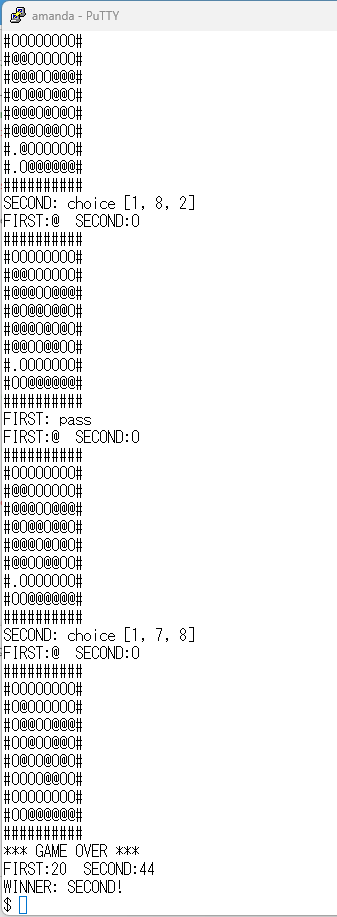
sample105.py は審判クラスを使った上記流れの実装デモになります。ユーザ・CPUがそれぞれランダムに駒を置いていきます。
whileの無限ループを作りその中で審判クラスの指示を受け取って指示毎に動作を行います。指示GAMEOVERが来ると無限ループを抜けて終了します。
実行するとこんな感じに。
さて、そろそろ実際に遊べるようにしたいですよね。
3-4. UIクラスを作る
続けてUIクラスを作りましょう。ここを完成させれば、とりあえず遊べるようになるので、もう少し頑張りましょう。
UIクラスを作る理由は、ゲールの処理からUIを独立して扱えるようにするためです。
今はコンソール上で操作するテキストベースのUIを使っていますが、
- もう少し豪華なUIのものと差し替えたり
- GUIでウインドウを出して扱えるようにしたり
- Webブラウザで操作可能にしたり
ができるようになります。
まず、今まで利用してきた gamerenderer モジュールは GameUI クラスに置換えされる事になります。gamerendererのロジックは流用しますので無駄ではありません。
なおGameUIクラスはChatGPTさんが雛形を作ってくれました。なので、コメントが親切です… また、他のモジュールにも修正を入れています。
</WRAP> 以降は追加されたファイル gameui.py と sample106.py の説明をしますね。
- gameui.py
from enum import IntEnum
from gameconstants import Cells
from gameconstants import Turn
import os


class InputResult(IntEnum):
    MOVE = 1
    PASS = 2
    QUIT = 3


class GameUI:

    def __init__(self, board):

        self.empty_char  = "."
        self.first_char  = "@"
        self.second_char = "O"

        self.x_labels = "abcdefgh"
        self.y_labels = "12345678"

        self.first_turn_label  = "FIRST"
        self.second_turn_label = "SECOND"
        self.user_turn_label   = "UNKNOWN"

        self._board       = board
        self.first_count  = 0
        self.second_count = 0

    # -----------------------------
    # コンソールクリア
    # -----------------------------
    def clear_screen(self):

        os.system("cls" if os.name == "nt" else "clear")

    # -----------------------------
    # 盤面表示
    # -----------------------------
    def draw_board(self):

        first_count  = 0
        second_count = 0

        self.clear_screen()

        print(f" {self.x_labels}")

        for y in range(0,8):

            line = self.y_labels[y]

            for x in range(1,9):

                cell = self._board.get_gameboard_cell(x,y+1)

                if cell == Cells.BLANK :
                    line += self.empty_char

                elif cell == Cells.FIRST_CHIP :
                    first_count += 1
                    line        += self.first_char

                elif cell == Cells.SECOND_CHIP :
                    second_count += 1
                    line         += self.second_char

            print(line)

        self.first_count  = first_count
        self.second_count = second_count

        print()
        print(f"{self.first_turn_label} : {first_count} , {self.second_turn_label} : {second_count}")

        return


    # -----------------------------
    # 終了画面
    # -----------------------------
    def draw_finish_screen(self) :

        print("*** GAME OVER ***")
        print(f"{self.first_turn_label} : {self.first_count} , {self.second_turn_label} : {self.second_count}")

        if self.first_count == self.second_count :
            print(f"draw game.")
        elif self.first_count > self.second_count :
            print("WINNER: {self.first_turn_label}!")
        else :
            print("WINNER: {self.second_turn_label}!")

        return


    # -----------------------------
    # 先手後手選択
    # -----------------------------
    def select_side(self):

        while True:

            text = input("先手(f) / 後手(s) ? > ").strip().lower()

            if text == "f":
                self.user_turn_label   = self.first_turn_label
                return Turn.FIRST

            if text == "s":
                self.user_turn_label   = self.second_turn_label
                return Turn.SECOND

            if text == "q":
                return Turn.QUIT

    # -----------------------------
    # 座標入力
    # -----------------------------
    def input_position(self, allow_pass=False):

        while True:

            text = input(f"{self.user_turn_label} 座標 > ").strip().lower()

            # 中断
            if "q" in text:
                return (InputResult.QUIT, None)

            # パス
            if "z" in text:

                if allow_pass:
                    return (InputResult.PASS, None)

                print("現在パスはできません")
                continue

            pos = self.parse_position(text)

            if pos is None:
                print("入力形式エラー")
                continue

            return (InputResult.MOVE, pos)

    # -----------------------------
    # 座標文字列解析
    # -----------------------------
    def parse_position(self, text):

        parts = text.split(",")

        if len(parts) != 2:
            return None

        a = parts[0].strip()
        b = parts[1].strip()

        # a,1
        result = self._parse_xy(a, b)

        if result is not None:
            return result

        # 1,a
        result = self._parse_xy(b, a)

        return result

    # -----------------------------
    # x,y解析
    # -----------------------------
    def _parse_xy(self, x_text, y_text):

        if x_text not in self.x_labels:
            return None

        if y_text not in self.y_labels:
            return None

        x = self.x_labels.index(x_text) + 1
        y = int(y_text)

        return (x, y)
盤面を表示したり、ユーザの入力を受け付けたり、を担当するクラスです。ChatGPTさんが例示してくれたものに少しだけ手を入れました。なので他のソースと少しテイストが違っています。
samplexxx.py に直接コーディングしていたものを分離してメソッド経由で操作する形にしてありますね。…GUI化する時もここで使っているメソッドと同じものを用意してクラスを挿げ替えればGUI化が完了してしまう事になります。
- draw_board() – 盤面の表示
- draw_finish_screen() – ゲーム終了時の表示
- select_side(self) – 先手/後手の選択
- input_position() – ユーザが駒を置く位置の入力
上記4つを用意すればとりあえず他のUIに切り替えることが可能になる予定です。
実際は各UI(を動作させるシステム上で)少しずつ勝手が異なるので対応するメソッドが追加される事になるでしょう。
例えばGUIならCPUの手番の時にCPUが置く場所を探す行動等の演出が追加したくなるかもしれません。
- sample106.py
import random
import gameboard as gb
import gamejudge as gj
import gameui    as gu
from gameconstants import Cells
from gameconstants import Turn
from gamejudge     import Direction
from gameui        import InputResult

## demo

gameboard = gb.GameBoard()
gamejudge = gj.GameJudge( gameboard ) ## share gameboard with GameJudge instance
gameUI    = gu.GameUI( gameboard )    ## share gameboard with GameUI instance

userchip  = Cells.UNKNOWN
userturn  = Turn.NOT_YET
cpuchip   = Cells.UNKNOWN
cputurn   = Turn.NOT_YET

while 1==1 :
    gameUI.draw_board()

    direction = gamejudge.get_instruction()

    ## ゲーム終了
    if direction == Direction.GAMEOVER :
        break

    ## ユーザの先手後手選択
    elif direction == Direction.USER_INPUT_TURN_ORDER :
        userturn = gameUI.select_side()

        if userturn == Turn.QUIT :
            break

        cputurn  = Turn.FIRST if userturn == Turn.SECOND else Turn.SECOND
        userchip = Cells.FIRST_CHIP if userturn == Turn.FIRST else Cells.SECOND_CHIP
        cpuchip  = Cells.FIRST_CHIP if cputurn  == Turn.FIRST else Cells.SECOND_CHIP
        gamejudge.set_user_turn_order( userturn )
        continue

    ## ユーザ入力
    elif direction == Direction.USER_INPUT_BOARD_POSITION :
        poslist = gameboard.collect_valid_positions(userchip)
        if len(poslist) != 0 :
            result, pos = gameUI.input_position()
            if result == InputResult.QUIT :
                break;
            else :
                gamejudge.set_user_input_position(pos[0], pos[1])
        else :
            gamejudge.set_user_input_pass()

    elif direction in (Direction.FIRST_TURN, Direction.SECOND_TURN) :
        poslist = gameboard.collect_valid_positions(cpuchip)
        if len(poslist) != 0 :
            pos = random.choice( poslist )
            gamejudge.set_input_position(pos[0], pos[1])
        else :
            gamejudge.set_input_pass()


gameUI.draw_finish_screen()
sample105.py を書き換えて GameUIクラスを利用する形に変更しました。 ほぼゲームのロジックのみの記述になりました。もう少しシンプルに出来そうな箇所が多々ありますが、あんまり凝っても仕方ありません。そろそろ遊んでみたいですからね。
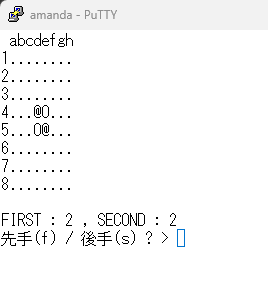
ということでsample106.pyを実行すると、最初はこんな表示になります。“f”の入力で先手、“s”の入力で後手、“q”の入力で終了になります。
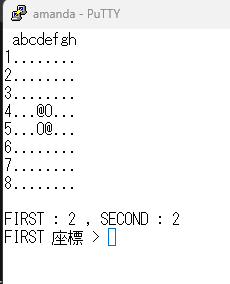
”f”を選ぶと先手としての入力待ちが始まります。
”s”を選ぶと後手となり、CPUの手番で駒が置かれた後に入力待ちが始まります。
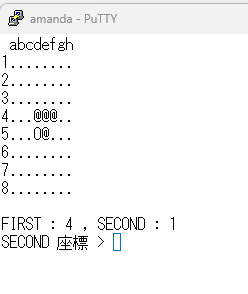
座標入力は “縦,横” もしくは “横,縦” でカンマ区切りで入力してください。置くことができない場所を指定すると、入力待ちに戻り画面は変化しないままになります。
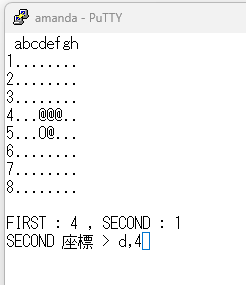
途中でやめるときは“q”を入力してください。
…あー、バグってますね。バグのある場所は gameui.py の中なのでご自身で修正を行ってみてください。
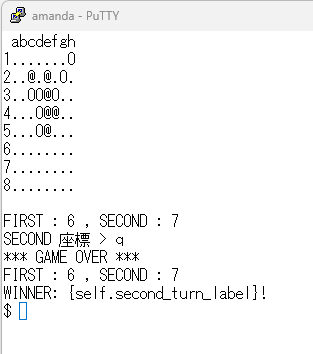
正しく直せればこのように表示が行われます。
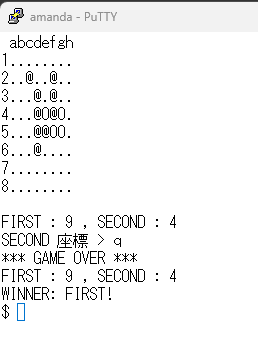
現在はまだCPUがランダムに駒を置いてくるのでそれほど強くはありません。ですが、とりあえず遊べるようになりました。