
documents:tools:others:tools-003
セキュアブート関連確認ツール
2026年3月28日
YouTubeのとあるセキュアブート問題説明動画を見てちょっとモヤったので作りました。
SecureBoot-Checkダウンロード
説明
セキュアブート関連設定を確認するためのツールです。
PowerShell5.1で動作を確認しています。
PowerShellのコンソールからスクリプトを実行する場合、そのコンソールは管理者として実行してください。 SecureBoot-Check.ps1が G:\sandbox に存在する場合、
cd /d G:\sandbox
powershell.exe -NoProfile -ExecutionPolicy Bypass -File .\SecureBoot-Check.ps1
EXEから実行する場合はSecureBoot-Check.exeをダブルクリックしてください。 UACで管理者権限を要求するので与えてください。
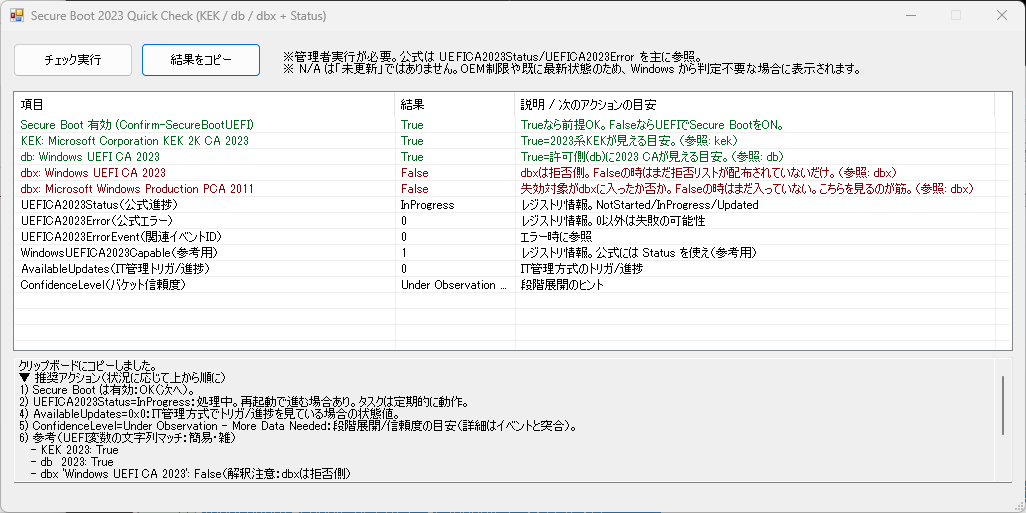
Readme.txtに説明を入れているのでそちらを確認しましょう。
その他
作り上、アンチウイルス製品が何か検出して動作を止めてくるかもしれません。 ※特にEXE実行時
その他2
駄目だダウンロードが阻止される…
PowerShellのコードも公開しておく(ZIP内にも入っている奴)
- SecureBoot-Check.ps1
#requires -version 5.1
# SecureBoot-Check.ps1
# GUIで KEK/db/dbx と、公式レジストリ進捗(UEFICA2023Status等)を表示し、
# 結果に応じた推奨アクション(分岐ロジック)を下部に出す。
# PS2EXEで -noConsole -requireAdmin を付けてEXE化する想定。

Set-StrictMode -Version Latest
$ErrorActionPreference = 'Stop'

Add-Type -AssemblyName System.Windows.Forms | Out-Null
Add-Type -AssemblyName System.Drawing       | Out-Null

# ------------------------
# 権限チェック(要件どおり:警告して終了)
# ------------------------
function Assert-AdminOrExit {
    $id = [Security.Principal.WindowsIdentity]::GetCurrent()
    $p  = New-Object Security.Principal.WindowsPrincipal($id)
    if (-not $p.IsInRole([Security.Principal.WindowsBuiltInRole]::Administrator)) {
        [System.Windows.Forms.MessageBox]::Show(
            "管理者として実行してください(右クリック → 管理者として実行)。",
            "Secure Boot 2023 Check",
            [System.Windows.Forms.MessageBoxButtons]::OK,
            [System.Windows.Forms.MessageBoxIcon]::Warning
        ) | Out-Null
        exit 1
    }
}

# ------------------------
# PowerShell標準チェック
# ------------------------
function Try-ConfirmSecureBoot {
    try { return Confirm-SecureBootUEFI } catch { return $null }
}


function Test-ByteSubsequence {
    param(
        [Parameter(Mandatory)][byte[]]$Haystack,
        [Parameter(Mandatory)][byte[]]$Needle
    )

    if ($Needle.Length -eq 0) { return $true }
    if ($Haystack.Length -lt $Needle.Length) { return $false }

    for ($i = 0; $i -le $Haystack.Length - $Needle.Length; $i++) {
        $ok = $true
        for ($j = 0; $j -lt $Needle.Length; $j++) {
            if ($Haystack[$i + $j] -ne $Needle[$j]) { $ok = $false; break }
        }
        if ($ok) { return $true }
    }
    return $false
}

function Try-UefiVarMatch {
    param(
        [Parameter(Mandatory)][string[]]$Names,   # 例: @('kek','KEKDefault')
        [Parameter(Mandatory)][string]$Needle
    )

    function Test-ByteSubsequence {
        param([byte[]]$Haystack, [byte[]]$Needle)
        if ($Needle.Length -eq 0) { return $true }
        if ($Haystack.Length -lt $Needle.Length) { return $false }

        for ($i = 0; $i -le $Haystack.Length - $Needle.Length; $i++) {
            $ok = $true
            for ($j = 0; $j -lt $Needle.Length; $j++) {
                if ($Haystack[$i + $j] -ne $Needle[$j]) { $ok = $false; break }
            }
            if ($ok) { return $true }
        }
        return $false
    }

    $errs = @()
    $needleAscii = [System.Text.Encoding]::ASCII.GetBytes($Needle)
    $needleUtf16 = [System.Text.Encoding]::Unicode.GetBytes($Needle)  # UTF-16LE

    foreach ($n in $Names) {
        try {
            # Get-SecureBootUEFI は UEFI変数を Bytes(byte[]) として返す
            $bytes = (Get-SecureBootUEFI -Name $n -ErrorAction Stop).Bytes

            $matched = (Test-ByteSubsequence $bytes $needleAscii) -or
                       (Test-ByteSubsequence $bytes $needleUtf16)

            return [pscustomobject]@{
                Readable = $true
                Matched  = [bool]$matched
                Error    = $null
                Source   = $n
            }
        }
        catch {
            $errs += ($n + ": " + $_.Exception.Message)
        }
    }

    return [pscustomobject]@{
        Readable = $false
        Matched  = $null
        Error    = ($errs -join " | ")
        Source   = $null
    }
}

# ------------------------
# 公式レジストリ読み取り
# ------------------------
function Try-GetRegValue {
    param(
        [Parameter(Mandatory)][string]$Path,
        [Parameter(Mandatory)][string]$Name
    )

    try {
        $v = (Get-ItemProperty -Path $Path -Name $Name -ErrorAction Stop).$Name
        return [pscustomobject]@{
            Readable = $true
            Value    = $v
            Error    = $null
        }
    }
    catch {
        return [pscustomobject]@{
            Readable = $false
            Value    = $null
            Error    = $_.Exception.Message
        }
    }
}

function To-Hex([object]$v) {
    if ($null -eq $v) { return "" }
    try {
        $n = [uint32]$v
        return ("0x{0:X}" -f $n)
    } catch {
        return "$v"
    }
}

function ShortErr([string]$s) {
    if ([string]::IsNullOrEmpty($s)) { return $null }
    if ($s.Length -gt 160) { return $s.Substring(0,160) + "..." }
    return $s
}

function BoolText([bool]$b) {
    if ($b) { "True" } else { "False" }
}

# ------------------------
# UIヘルパ
# ------------------------

function Set-RowBool {
    param(
        [System.Windows.Forms.ListViewItem]$Item,
        [object]$Value,   # ← Nullableに拘らない
        [string]$Note,
        [string]$Err
    )

    if ($null -eq $Value) {
        $Item.SubItems[1].Text = "N/A"
        $Item.ForeColor = [System.Drawing.Color]::Gray

        $se = ShortErr $Err
        if ($null -ne $se) { $Item.SubItems[2].Text = $Note + " / " + $se }
        else               { $Item.SubItems[2].Text = $Note }
        return
    }

    # $Value は bool のことも Nullable[bool] のこともあるので、boolに寄せて評価
    $b = [bool]$Value
    if ($b) {
        $Item.SubItems[1].Text = "True"
        $Item.ForeColor = [System.Drawing.Color]::DarkGreen
    } else {
        $Item.SubItems[1].Text = "False"
        $Item.ForeColor = [System.Drawing.Color]::DarkRed
    }
    $Item.SubItems[2].Text = $Note
}

function Set-RowText {
    param(
        [System.Windows.Forms.ListViewItem]$Item,
        [string]$ValueText,
        [string]$Note,
        [string]$Err
    )

    if (-not [string]::IsNullOrEmpty($ValueText)) {
        $Item.SubItems[1].Text = $ValueText
        $Item.ForeColor = [System.Drawing.Color]::Black
        $Item.SubItems[2].Text = $Note
    } else {
        $Item.SubItems[1].Text = "N/A"
        $Item.ForeColor = [System.Drawing.Color]::Gray

        $se = ShortErr $Err
        if ($null -ne $se) {
            $Item.SubItems[2].Text = $Note + " / " + $se
        } else {
            $Item.SubItems[2].Text = $Note
        }
    }
}

# ------------------------
# 推奨アクション生成(分岐ロジック)
# ------------------------
function Build-Recommendations {
    param(
        [Nullable[bool]]$SecureBoot,
        [string]$UEFICA2023Status,
        [Nullable[uint32]]$UEFICA2023Error,
        [Nullable[uint32]]$UEFICA2023ErrorEvent,
        [Nullable[uint32]]$AvailableUpdates,
        [string]$ConfidenceLevel,
        [Nullable[bool]]$Kek2023,
        [Nullable[bool]]$Db2023,
        [Nullable[bool]]$DbxWinUefi2023,
        [Nullable[bool]]$DbxPca2011
    )

    $out = New-Object System.Collections.Generic.List[string]
    $out.Add("▼ 推奨アクション(状況に応じて上から順に)")

    # 1) 前提
    if ($SecureBoot -eq $false) {
        $out.Add("1) Secure Boot が無効:UEFI設定で Secure Boot を ON(まずここ)。")
        $out.Add("   ※この状態では証明書更新の確認自体が意味を持ちにくい。")
        return ($out -join "`r`n")
    }
    elseif ($SecureBoot -eq $null) {
        $out.Add("1) Secure Boot 状態が取得できない:UEFI起動/対応機か、プラットフォーム制約の可能性。")
        $out.Add("   → msinfo32 の「BIOSモード」「セキュアブートの状態」確認、または機種/VM設定を見直し。")
    } else {
        $out.Add("1) Secure Boot は有効:OK(次へ)。")
    }

    # 2) 公式進捗(主軸)
    if (-not [string]::IsNullOrEmpty($UEFICA2023Status)) {
        switch ($UEFICA2023Status) {
            "Updated" {
                $out.Add("2) UEFICA2023Status=Updated:証明書/ブートマネージャ展開が完了している扱い。")
            }
            "InProgress" {
                $out.Add("2) UEFICA2023Status=InProgress:処理中。再起動で進む場合あり。タスクは定期的に動作。")
            }
            "NotStarted" {
                $out.Add("2) UEFICA2023Status=NotStarted:まだ開始していない。")
                $out.Add('   - 個人PC:Windows Updateを継続(段階展開で「False=故障」ではない)。')
                $out.Add("   - IT管理(WSUS/Intune等):必要なら Microsoft の AvailableUpdates(0x5944) 方式でトリガ可能。")
            }
            default {
                $out.Add(("2) UEFICA2023Status={0}:未知状態。UEFICA2023Error/イベントも併せて確認。" -f $UEFICA2023Status))
            }
        }
    } else {
        $out.Add("2) UEFICA2023Status が見えない:未対応OS/未適用更新、またはキー未作成の可能性。")
        $out.Add("   → まずWindows Update・メーカーBIOS更新の適用状況を確認。")
    }

    # 3) エラーがあるならそこが最優先
    if ($UEFICA2023Error -ne $null -and ([uint32]$UEFICA2023Error) -ne 0) {
        $out.Add("3) UEFICA2023Error が非0:更新がどこかで失敗。イベントログ(エラーイベント)の確認が優先。")
        if ($UEFICA2023ErrorEvent -ne $null) {
            $out.Add(("   - UEFICA2023ErrorEvent={0}(関連イベントID)" -f ([uint32]$UEFICA2023ErrorEvent)))
        }
        $out.Add("   → 典型的にはファームウェア要因もあるので、BIOS/UEFI更新の有無を確認。")
    }

    # 4) AvailableUpdates(IT管理向け観測)
    if ($AvailableUpdates -ne $null) {
        $out.Add(("4) AvailableUpdates={0}:IT管理方式でトリガ/進捗を見ている場合の状態値。" -f (To-Hex ([uint32]$AvailableUpdates))))
    }

    if (-not [string]::IsNullOrEmpty($ConfidenceLevel)) {
        $out.Add(("5) ConfidenceLevel={0}:段階展開/信頼度の目安(詳細はイベントと突合)。" -f $ConfidenceLevel))
    }

    # 5) 参考(文字列マッチ)
    $out.Add("6) 参考(UEFI変数の文字列マッチ:簡易・雑)")
    if ($Kek2023 -ne $null) { $out.Add(("   - KEK 2023: {0}" -f (BoolText $Kek2023))) }
    if ($Db2023  -ne $null) { $out.Add(("   - db  2023: {0}" -f (BoolText $Db2023))) }

    if ($DbxWinUefi2023 -ne $null) {
        $out.Add(("   - dbx 'Windows UEFI CA 2023': {0}(解釈注意:dbxは拒否側)" -f (BoolText $DbxWinUefi2023)))
    }
    if ($DbxPca2011 -ne $null) {
        $out.Add(("   - dbx 'Microsoft Windows Production PCA 2011': {0}(失効更新の目安としてはこっちが筋)" -f (BoolText $DbxPca2011)))
    }

    $out.Add("")
    $out.Add("▼ 判断の芯")
    $out.Add("- 進捗/成否は UEFICA2023Status / UEFICA2023Error を主に見る(公式)。")
    $out.Add("- 文字列マッチは「ざっくり観測」。矛盾したら公式ステータスを優先。")

    return ($out -join "`r`n")
}

# ---- UI開始 ----
Assert-AdminOrExit

$form = New-Object System.Windows.Forms.Form
$form.Text = "Secure Boot 2023 Quick Check (KEK / db / dbx + Status)"
$form.Size = New-Object System.Drawing.Size(1040, 520)
$form.StartPosition = "CenterScreen"
$form.MaximizeBox = $false

$btnRun = New-Object System.Windows.Forms.Button
$btnRun.Text = "チェック実行"
$btnRun.Size = New-Object System.Drawing.Size(120, 34)
$btnRun.Location = New-Object System.Drawing.Point(12, 12)

$btnCopy = New-Object System.Windows.Forms.Button
$btnCopy.Text = "結果をコピー"
$btnCopy.Size = New-Object System.Drawing.Size(120, 34)
$btnCopy.Location = New-Object System.Drawing.Point(140, 12)

$lbl = New-Object System.Windows.Forms.Label
$lbl.AutoSize = $true
$lbl.Location = New-Object System.Drawing.Point(280, 20)
$lbl.Text = "※管理者実行が必要。公式は UEFICA2023Status/UEFICA2023Error を主に参照。`n※ N/A は「未更新」ではありません。OEM制限や既に最新状態のため、Windows から判定不要な場合に表示されます。"

$split = New-Object System.Windows.Forms.SplitContainer
$split.Orientation = [System.Windows.Forms.Orientation]::Horizontal
$split.Location = New-Object System.Drawing.Point(12, 60)
$split.Size = New-Object System.Drawing.Size(1000, 392)
$split.Anchor = 'Top,Bottom,Left,Right'
$split.SplitterWidth = 6
$split.Panel1MinSize = 180
$split.Panel2MinSize = 80
$split.SplitterDistance = 260   # 初期:上を広めに

$list = New-Object System.Windows.Forms.ListView
$list.View = 'Details'
$list.FullRowSelect = $true
$list.GridLines = $true
$list.Dock     = 'Fill'

[void]$list.Columns.Add("項目", 380)
[void]$list.Columns.Add("結果", 120)
[void]$list.Columns.Add("説明 / 次のアクションの目安", 480)

function Add-Row([string]$title, [string]$note) {
    $it = New-Object System.Windows.Forms.ListViewItem($title)
    [void]$it.SubItems.Add("")
    [void]$it.SubItems.Add($note)
    [void]$list.Items.Add($it)
    return $it
}

$rowSB    = Add-Row "Secure Boot 有効 (Confirm-SecureBootUEFI)" "前提確認。"
$rowKEK   = Add-Row "KEK: Microsoft Corporation KEK 2K CA 2023" "簡易確認(文字列マッチ)。"
$rowDB    = Add-Row "db: Windows UEFI CA 2023" "簡易確認(文字列マッチ)。"
$rowDBX1  = Add-Row "dbx: Windows UEFI CA 2023" "dbxは拒否(失効)側。"
$rowDBX2  = Add-Row "dbx: Microsoft Windows Production PCA 2011" "失効更新の目安としてはこっちが筋。"

$rowStat  = Add-Row "UEFICA2023Status(公式進捗)" "NotStarted/InProgress/Updated(公式)。"
$rowErr   = Add-Row "UEFICA2023Error(公式エラー)" "0以外なら失敗(公式)。"
$rowErrEv = Add-Row "UEFICA2023ErrorEvent(関連イベントID)" "エラー時に参照(公式)。"
$rowCap   = Add-Row "WindowsUEFICA2023Capable(参考用)" "公式は Status を使え(Capableは参考)。"
$rowAvail = Add-Row "AvailableUpdates(IT管理トリガ/進捗)" "IT管理方式の観測用(公式)。"
$rowConf  = Add-Row "ConfidenceLevel(バケット信頼度)" "段階展開のヒント(公式)。"

$log = New-Object System.Windows.Forms.TextBox
$log.Multiline  = $true
$log.ScrollBars = "Vertical"
$log.ReadOnly   = $true
$log.Dock       = 'Fill'

function Run-Checks {

    # 1) SecureBoot
    $sb = Try-ConfirmSecureBoot
    Set-RowBool -Item $rowSB -Value $sb -Note "Trueなら前提OK。FalseならUEFIでSecure BootをON。" -Err $null

    # KEK確認(Active→Default)
    $r = Try-UefiVarMatch -Names @('kek','KEKDefault') -Needle 'Microsoft Corporation KEK 2K CA 2023'
    $kek2023 = $r.Matched
    $err = $r.Error
    $src = $r.Source
    $srcText = "なし"
    if ($null -ne $src -and $src -ne "") { $srcText = $src }
    Set-RowBool -Item $rowKEK -Value $kek2023 -Note ("True=2023系KEKが見える目安。(参照: {0})" -f $srcText) -Err $err

    # DB確認
    $r = Try-UefiVarMatch -Names @('db','dbDefault') -Needle 'Windows UEFI CA 2023'
    $db2023 = $r.Matched
    $err = $r.Error
    $src = $r.Source
    $srcText = "なし"
    if ($null -ne $src -and $src -ne "") { $srcText = $src }
    Set-RowBool -Item $rowDB -Value $db2023 -Note ("True=許可側(db)に2023 CAが見える目安。(参照: {0})" -f $srcText) -Err $err

    # DBX確認
    # 何処かのパソコン博士が説明してない話
    $r = Try-UefiVarMatch -Names @('dbx','dbxDefault') -Needle 'Windows UEFI CA 2023'
    $dbxWinUefi2023 = $r.Matched
    $err = $r.Error
    $src = $r.Source
    $srcText = "なし"
    if ($null -ne $src -and $src -ne "") { $srcText = $src }
    Set-RowBool -Item $rowDBX1 -Value $dbxWinUefi2023 -Note ("dbxは拒否側。Falseの時はまだ拒否リストが配布されていないだけ。(参照: {0})" -f $srcText) -Err $err

    # DBX確認(失効対象確認)
    $r = Try-UefiVarMatch -Names @('dbx','dbxDefault') -Needle 'Microsoft Windows Production PCA 2011'
    $dbxPca2011 = $r.Matched
    $err = $r.Error
    $src = $r.Source
    $srcText = "なし"
    if ($null -ne $src -and $src -ne "") { $srcText = $src }
    Set-RowBool -Item $rowDBX2 -Value $dbxPca2011 -Note ("失効対象がdbxに入ったか否か。Falseの時はまだ入っていない。こちらを見るのが筋。(参照: {0})" -f $srcText) -Err $err

    # 3) 公式レジストリ
    $pBase = "HKLM:\SYSTEM\CurrentControlSet\Control\SecureBoot"
    $pSvc  = "HKLM:\SYSTEM\CurrentControlSet\Control\SecureBoot\Servicing"

    ## 公式進捗
    $r = Try-GetRegValue -Path $pSvc -Name "UEFICA2023Status"
    $status = $r.Value
    $e1     = $r.Error
    $vt = ""
    if ($r.Readable -and $null -ne $status) { $vt = "$status" }
    Set-RowText -Item $rowStat -ValueText $vt -Note "レジストリ情報。NotStarted/InProgress/Updated" -Err $e1

    ## 公式エラー情報
    $r = Try-GetRegValue -Path $pSvc -Name "UEFICA2023Error"
    $errCodeN = $r.Value
    $e2       = $r.Error
    $vt = ""
    if ($r.Readable -and $null -ne $errCodeN) { $vt = "$errCodeN" }
    Set-RowText -Item $rowErr -ValueText $vt -Note "レジストリ情報。0以外は失敗の可能性" -Err $e2

    ## 公式エラー時関連イベントID
    $r = Try-GetRegValue -Path $pSvc -Name "UEFICA2023ErrorEvent"
    $errEvN = $r.Value
    $e3     = $r.Error
    $vt = ""
    if ($r.Readable -and $null -ne $errEvN) { $vt = "$errEvN" }
    Set-RowText -Item $rowErrEv -ValueText $vt -Note "エラー時に参照" -Err $e3

    ## 公式エラー時参考用
    $r = Try-GetRegValue -Path $pSvc -Name "WindowsUEFICA2023Capable"
    $capN = $r.Value
    $e4   = $r.Error
    $vt = ""
    if ($r.Readable -and $null -ne $capN) { $vt = "$capN" }
    Set-RowText -Item $rowCap -ValueText $vt -Note "レジストリ情報。公式には Status を使え(参考用)" -Err $e4

    ## IT管理方式の観測用(公式)
    $r = Try-GetRegValue -Path $pBase -Name "AvailableUpdates"
    $availN = $r.Value
    $e5     = $r.Error
    $vt     = ""
    if ($r.Readable -and $null -ne $availN) { $vt = "$availN" }
    Set-RowText -Item $rowAvail -ValueText $vt -Note "IT管理方式のトリガ/進捗" -Err $e5

    ## 段階展開のヒント(公式)
    $r = Try-GetRegValue -Path $pSvc -Name "ConfidenceLevel"
    $conf = $r.Value
    $e6   = $r.Error
    $vt = ""
    if ($r.Readable -and $null -ne $conf) { $vt = "$conf" }
    Set-RowText -Item $rowConf -ValueText $vt -Note "段階展開のヒント" -Err $e6

    # 4) 分岐ロジックの結論
    $log.Text = Build-Recommendations `
        -SecureBoot $sb `
        -UEFICA2023Status ($status -as [string]) `
        -UEFICA2023Error $errCodeN `
        -UEFICA2023ErrorEvent $errEvN `
        -AvailableUpdates $availN `
        -ConfidenceLevel ($conf -as [string]) `
        -Kek2023 $kek2023 `
        -Db2023 $db2023 `
        -DbxWinUefi2023 $dbxWinUefi2023 `
        -DbxPca2011 $dbxPca2011
}

function Copy-ResultsToClipboard {
    $lines = New-Object System.Collections.Generic.List[string]
    foreach ($it in $list.Items) {
        $lines.Add(("{0}`t{1}`t{2}" -f $it.Text, $it.SubItems[1].Text, $it.SubItems[2].Text))
    }
    [System.Windows.Forms.Clipboard]::SetText(($lines -join "`r`n"))
    $log.Text = "クリップボードにコピーしました。`r`n" + $log.Text
}

$btnRun.Add_Click({ Run-Checks })
$btnCopy.Add_Click({ Copy-ResultsToClipboard })


$split.Panel1.Controls.Add($list)
$split.Panel2.Controls.Add($log)

$form.Controls.AddRange(@($btnRun, $btnCopy, $lbl, $split))

# 初回自動実行
Run-Checks

[void]$form.ShowDialog()
documents/tools/others/tools-003.txt · 最終更新: by k896951